I have tried to search the forum for an answer but the posts are either too specific or do not cover my issue.
I run webmin and virtualmin on a VPS using ubuntu 20.04.6 and it has run successfully for some years.
I use Wordpress websites and they are now complaining about the php version and I need to update to php 8.3. To do this I believe I have to upgrade the OS from 20.04.6 to the latest LTS version which is 26.04.
I am an occasional user so am looking for clear guidelines on what I need to backup and how to do it.
The VPS provider clearly states that upgrading will destroy all data so I need a way to preserve it and reinstall it after the upgrade is completed.
I can backup the various websites directory structure over ftp but how do I backup and preserve all my webmin and virtualmin packages and settings so that I can regenerate the server after the upgrade?
If there is a link to an idiot’s guide please share it as I cannot find it.
In the Virtualmin tab you got the option “Backup and Restore”. There you can go to “Backup Virtual Servers”. There is also the option to save the virtualmin settings.
In the Webmin tab you got the option “Backup Configuration Files”, that should do the rest of it.
I’d advise caution with this one. Going from 20.04 to 26.04 is very likely to have a bunch of incompatible config files.
Obviously if you have a lot of customizations to the various services and don’t know what they are, you’ll need to bring that over, somehow, but a naive copy is probably going to make a mess.
That said, I think the majority of people mostly leave configuration alone, and, if they didn’t they presumably know what changes they made and can bring them over individually.
It’s useful to make those backups, so you can compare line-by-line and decide what you want to bring across. But, I wouldn’t restore config files en masse from an very old Ubuntu version to a very new version (and definitely not to a different distribution).
For Virtualmin domain backups, the restore will mostly handle any differences across versions. but, the same isn’t true of the Webmin config backups (there’s just no way to safely/gracefully handle that kind of thing).
A much better way is to get yourself another server instance, install everything fresh there, and move the backups over. I just did this, and I’m very thankful I did not attempt an in-place upgrade… it would have been a disaster. I had the old server available the whole time, and could shuttle between them and fix issues using the old server as a working template.
You may be able to contact your provider, explain what you’re trying to do, and see if they will facilitate setting up a new server / giving you a week or two to migrate everything / de-activate the old server. Mine did, at no cost.
Another pro tip: use ChatGPT / Claude / etc to walk you through this process.
Oh, yeah, I didn’t even notice this was a “I’m about to blow everything away” post. Just get a new VM with a new OS! Then move at your leisure with no risk of data loss. You can flip the switch to the new server, once you know everything came over clean and all services are happy.
Migration is always the best choice. Least risk, shortest minimum downtime, and just an overall more enjoyable experience.
Which ran fine and told me I could log into virtualmin on i.p.address:10000. It displayed the default Apache window on the main server.
However, it just hung and worse still, the ssh into the main vps server on which it is installed is also not working so I cannot appear to access anything. Rebooted twice but no difference.
Is this because it is a Grade B server? when will it update to grade A as it is the official LTS version of Ubuntu?
Apologies, the Apache page came up on the main server (just the ip address). Virtualmin came up on Ip.address:10000.
I decided after talking to IONOS to reinstall the image (ubuntu 26.04) and then try again.
Installation went fine. I accessed Virtualmin and went through the configuration stages. I also checked that ssh access was available and it was fine. Took the plunge and restarted the VPS server and once again it all went wrong.
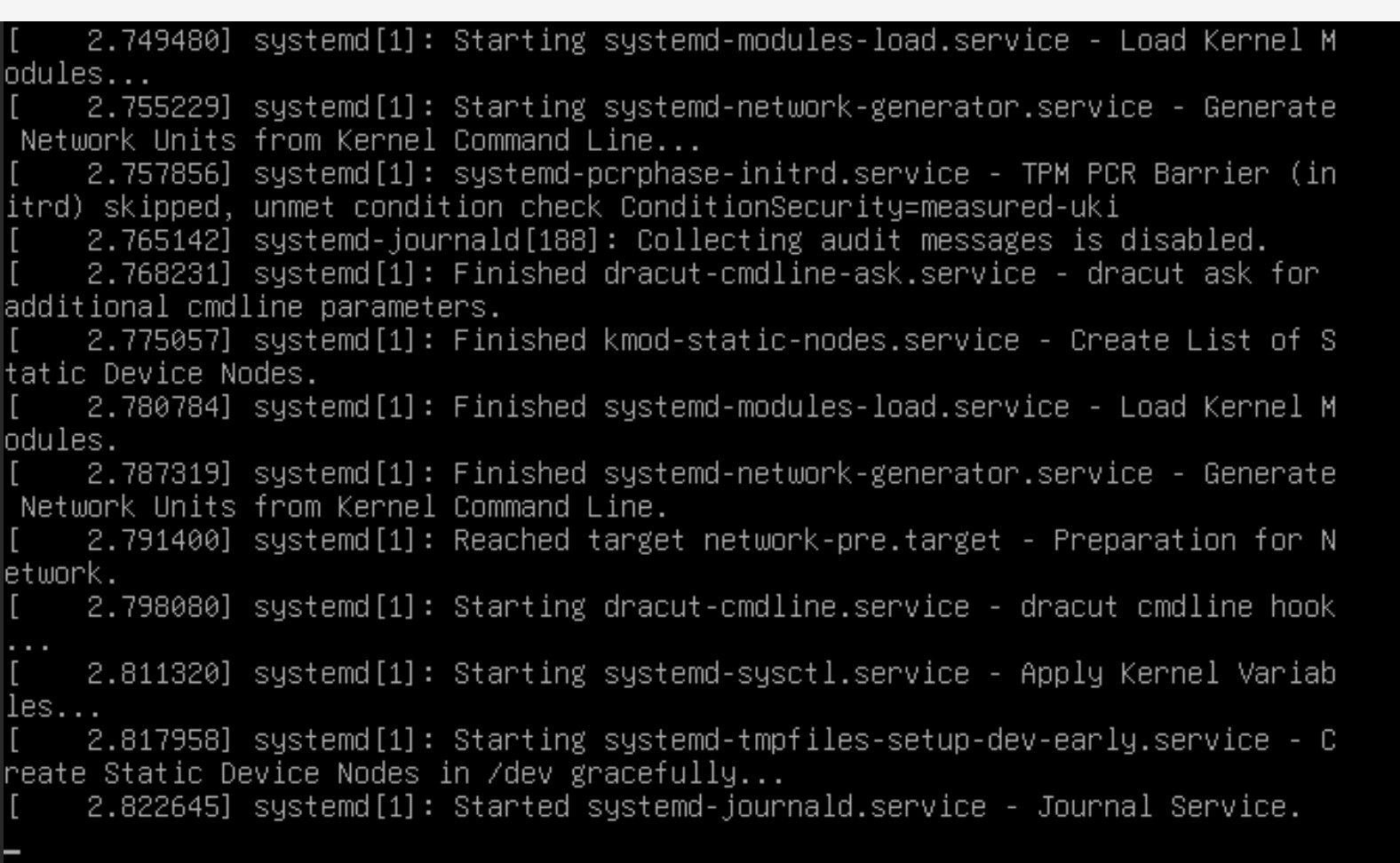
When I access my IONOS dashboard and use remote panel (equivalent to ssh I assume) it has stalled in the boot up stage as shown below:
I just installed Ubuntu 26.04 on Vultur and ran the same installation command you mentioned. Everything worked fine: SSL for the hostname was requested successfully, and all services, including spam and virus protection, set up without issues. I also created a domain and requested SSL, which worked perfectly too.
cloud-init and firewalld also installed together without problems, unlike on Debian 13.
However, the reboot still fails, and unfortunately, it seems related to the firewalld and cloud-init conflict we all saw on Debian 13.
Yet, it’s worse than on Debian 13, which simply blocks firewalld from being installed alongside cloud-init on the package manager level.
Someone should report it to the Ubuntu 26.04 developers!
…a few moments later, after rebooting to recovery shell, I removed the firewalld package, and the system rebooted successfully.
To conclude, unfortunately, the issue with firewalld and cloud-init conflict still persists, and in a worse, hidden shape than on Debian 13.
@Joe, I’ll just make the Debian 13 and Ubuntu 26.04 systems to use the nftables and adjust fail2ban accordingly. That’ll be quicker than waiting for an upstream fix.
Yep, that’s a good call. I want to move to nftables, anyway. Firewalld was a mistake. I thought folks wanted a higher level tool, but most people find it more confusing than iptables (and nftables is nicer to use than iptables, though it is new, and I guess we’ll have some confused users with it for a while, too).
Since Firewalld is simply broken on new Debian and Ubuntu, we just need to drop it. Kinda inclined to suggest we drop it across the board for all supported distros. nftables has been available longer than any of our supported distro versions, so it’s definitely in the repos. I doubt anybody is going to demand we keep firewalld, I don’t think anybody actually likes it (but I’m willing to hear otherwise). nftables is certainly my preference.
Since you asked, I’d say don’t do anything for now. I’ll finish things up and give you a working solution so you can just reinstall Ubuntu 26.04 and use the updated install script that handles everything properly.