An Apache install - beginning to wish I had stayed well clear normally a LEMP install.
Created a VS (actually 4) not really thinking there would be a problem.
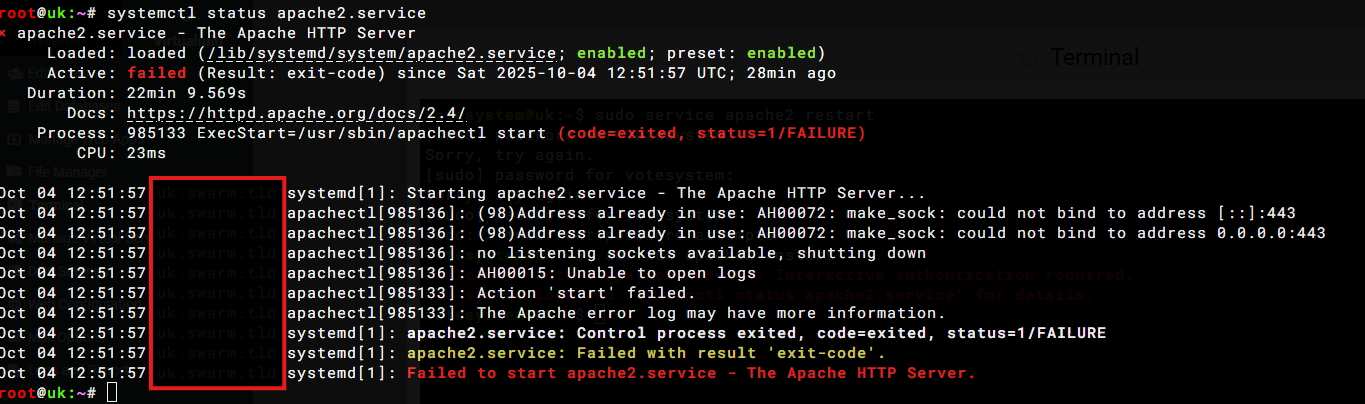
all went well until adding SSL (a classic error) - easily traced back to Apache Server not started (well that was obvious). but why? - attempted to restart - no luck!
rather obviously nothing in access or error log.
limits and validation -> apache website = all features are good
yes it does,
but now having looked in /etc/apache2/ports.conf no repeated ports.
following a reboot after disabling all but one VS
(should be easier to trace what is going wrong?)
it looks like it starts
but then apache2 still refuses to remain started.
it is just a development server atm, so plenty of time to put it right/start over just not impressing client
(there was a reason why i stopped using apache)
sure - that was the first place I looked but rather obviously if the webserver does not start nothing gets written there - which is why I looked at systemctl status apache2.service and journalctl -xeu apache2.service
the apache2.service is killed during bind ??? “unable to open logs”
What’s running on port 443 that is stopping apache from starting ? in your screen shot it shows that port 443 is being used by another service or you have too many listen statements in ports.conf, which should only contain
Listen 80
Listen 443
also check that you haven’t added any listen statements to any virtual server config files
yes ports.conf was checked and was set to just that following @ID10T 's post above (I removed the specific Listen xxx.xxx.xxx.xxx 443 and Listen [ipv6] 443
I also looked in the /etc/apache2/sites-available/domain.conf
(must say it is full of the usual apache nonsense) but nothing I could make out that could be really odd.
remember this is a new VM all I have done is added Virtualmin and 4 VS and attempted to add (LE) SSL - I have not edited anything - no PHP/NodeJS/not even client’s website
I probably have forgotten more Apache than I ever learned - I am more use with nginx these days
that is not a problem - just glad of any help
running perhaps - but for how long?
yesterday i somehow resolved the sub server error (Web Options not working)
and then re-booted but that has led to a new error (even worse! - new topic - domain - no login) I’m at the point of giving up.
 - beginning to wish I had stayed well clear normally a LEMP install.