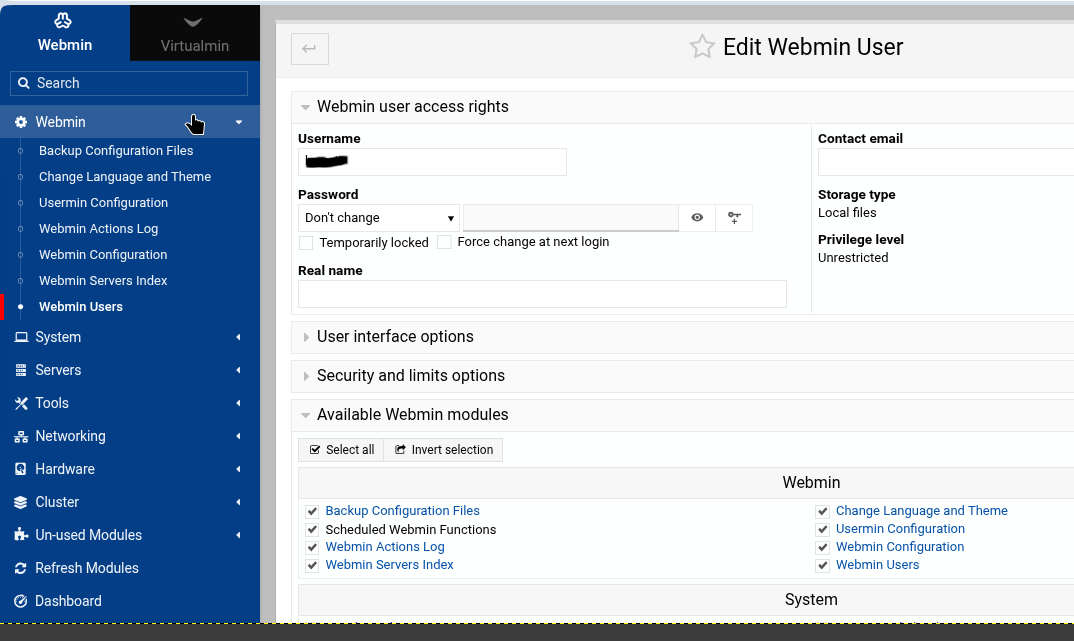
I’ve installed a new server with AlmaLinux 9.6 and installed Webmin using the webmin-setup-repo.sh script, no problems there. For the server login I have left root disabled and created my own user which has been added the Wheel group.
To begin with when I tried to login to Webmin I was met with login failed, so I’ve added my user account to miniserv.users and copied the settings for root in webmin.acl which now allows me to login to Webmin.
Now that I can login to Webmin I am able to see the dashboard, but a lot of the menu items and modules seem be missing. As an example the server is running PostgreSQL but I can’t see/or refresh the modules to manage it.
I imagine that I’m missing the necessary permissions but am unsure what I need to add, or alternatively have I errored in the way I added the user to Webmin?
Webmin starts off with allowing root or admin. You then use the module to allow others. So, the user disallowed root.
Webmin Users
March 14, 2023
· 19 min · Jamie Cameron |
Suggest Changes
About
A standard, out-of-the-box Webmin installation has only one user called root or admin, who can use every feature of every module
Webmin defaults to allowing any user that has sudo ALL privileges to login and be treated as root.
So, show us the output of sudo -l when you’re logged in via ssh as the user you’re trying to log in as.
Note that your user must have a password, even if you only allow key-based authentication for the user.
I recommend you not have independent user passwords (Webmin users+system users), which is what happens if you use the Webmin changepass.pl (which you’ll probably run into as a suggestion if you keep going down the path of managing Webmin users independently of the system users).
Where in the docs? I’d like to update it. It’s been true for almost many years that Webmin allows sudo users to login. (But the two books from which the docs were originally drawn were written a few years before that.)
Is ‘wheel’ still at thing? I think it was kind of deprecated in Debian a while back as I recall. visudo is the current method to add someone. I’m not sure if he just added to wheel if that’s the same thing but I’m not familiar with RH derivatives much anymore.
root@main:/etc/webmin# grep -r wheel /etc
/etc/pam.d/su:# Uncomment this to force users to be a member of group wheel
/etc/pam.d/su:# than the default "wheel" (but this may have side effect of
/etc/pam.d/su:# auth       required   pam_wheel.so
/etc/pam.d/su:# Uncomment this if you want wheel members to be able to
/etc/pam.d/su:# auth       sufficient pam_wheel.so trust
/etc/pam.d/su:# auth       required   pam_wheel.so deny group=nosu
/etc/dovecot/conf.d/10-mail.conf:# Valid GID range for users, defaults to non-root/wheel. Users having
/etc/sudo_logsrvd.conf:#iolog_group = wheel
/etc/security/access.conf:#-:ALL EXCEPT wheel shutdown sync:LOCAL
/etc/security/access.conf:# Same, but make sure that really the group wheel and not the user
/etc/security/access.conf:# wheel is used (use nodefgroup argument, too):
/etc/security/access.conf:#-:ALL EXCEPT (wheel) shutdown sync:LOCAL
/etc/security/access.conf:# Disallow non-local logins to privileged accounts (group wheel).
/etc/security/access.conf:#-:wheel:ALL EXCEPT LOCAL .win.tue.nl
Matching Defaults entries for pXXXXXXXXn on SVR-XXX-XXX-X:
!visiblepw, always_set_home, match_group_by_gid, always_query_group_plugin, env_reset, env_keep=“COLORS DISPLAY HOSTNAME HISTSIZE KDEDIR LS_COLORS”, env_keep+=“MAIL PS1 PS2
QTDIR USERNAME LANG LC_ADDRESS LC_CTYPE”, env_keep+=“LC_COLLATE LC_IDENTIFICATION LC_MEASUREMENT LC_MESSAGES”, env_keep+=“LC_MONETARY LC_NAME LC_NUMERIC LC_PAPER
LC_TELEPHONE”, env_keep+=“LC_TIME LC_ALL LANGUAGE LINGUAS _XKB_CHARSET XAUTHORITY”, secure_path=/sbin:/bin:/usr/sbin:/usr/bin
User pXXXXXXXXn may run the following commands on SVR-XXX-XXX-X:
(ALL) ALL
The sudo user does have a password set which is used for the Webmin login, not a separate password set within Webmin. To enable the account I only modified the two files already mentioned.
I suspect there’s been a change in the output of that command, as it looks quite messy..though I would have thought the last couple lines would do the thing.
The output (ALL) ALL from sudo -l looks fine to me.
Try enabling the debug log by editing /etc/webmin/miniserv.conf and adding the line debuglog=/var/webmin/miniserv.debug , then running /etc/webmin/restart
Then try to login as the problem user, then run grep sudo /var/webmin/miniserv.debug and post the output here.
Hi, I have the same problem.
My sudo user is flexjoly, but I cannot login to web/virtualmin on rocky os.
[flexjoly@vc3 ~]$ sudo -l
[sudo] password for flexjoly:
Matching Defaults entries for flexjoly on vc3:
    !visiblepw, always_set_home, match_group_by_gid, always_query_group_plugin, env_reset, env_keep="COLORS DISPLAY
    HOSTNAME HISTSIZE KDEDIR LS_COLORS", env_keep+="MAIL PS1 PS2 QTDIR USERNAME LANG LC_ADDRESS LC_CTYPE",
    env_keep+="LC_COLLATE LC_IDENTIFICATION LC_MEASUREMENT LC_MESSAGES", env_keep+="LC_MONETARY LC_NAME LC_NUMERIC
    LC_PAPER LC_TELEPHONE", env_keep+="LC_TIME LC_ALL LANGUAGE LINGUAS _XKB_CHARSET XAUTHORITY",
    secure_path=/sbin\:/bin\:/usr/sbin\:/usr/bin

User flexjoly may run the following commands on vc3:
    (ALL) ALL
[flexjoly@vc3 ~]$
This is a fresh re-install on rocky-os. I did one before a 2 weeks ago, with chatgpt I got it working by changing some files.
This week we re-installed rocky and virtualmin. But I cannot login with my flexjoly-user.