Virtual server PHP broken after using the Web App installer for installing Wordpress

SYSTEM INFORMATION
OS type and version Ubuntu Linux 24.04.4
Webmin version 2.621
Virtualmin version 8.1.0 GPL
Webserver version what is this?
Related packages SUGGESTED

I’m running a Virtualmin server with different virtual server.
On a test.domain.ext virtualmin server I used the Manage Web Apps tool to Install Wordpress.

This caused issue to PHP on other virtual server.

What seems happened:
I run PHP 8.4 for all virtual server.

After the Wordpress installation made by the Manage Web Apps section seems my helpdesk.domain.ext that run freescout was served by PHP 8.4 but PHP 8.5 on SSH infact the info.php was showing PHP 8.4 but on SSH as client PHP the version PHP 8.5 was set by default not by me.

On the domain helpdesk.domain.ext, FreeScout CLI jobs (such as automatic email fetching) were failing with the error: could not find driver (SQL: select * from options ...).

This happened because the default PHP version for the CLI was PHP 8.5, while the site and FreeScout were configured to use PHP 8.4 via PHP-FPM.

I suppose the cause of this issue was because I used the Manage Web Apps on test.domain.ext to install Wordpress. After this I started to have issue on helpdesk.domain.ext this broken completely FreeScout as PHP start to have issues.

Although the pdo_mysql module was installed and available for PHP-FPM, the CLI did not load it, causing any command run via CLI (artisan, cron jobs, queue workers) to fail with the PDO error.

After setting PHP 8.4 as the default CLI version for the helpdesk user, the PDO drivers were properly loaded, and FreeScout jobs started working correctly.

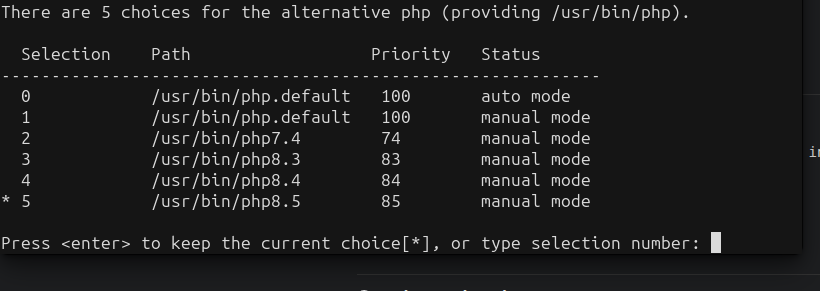
sudo update-alternatives --config php

Likely cause: Installing WordPress via Virtualmin’s “Manage Web Apps” may have changed the user’s default PHP version to 8.5, creating a mismatch between the web server PHP version (8.4) and the CLI version (8.5), which caused PDO/MySQL-related CLI commands to fail.

I just report this issue because let cause downtime and let me work for more then an hour to diagnose and fix this.
When I install a newer version of php, on Ubuntu, it changes the cli version of php to that higher version.

Depends on how you look at that, if you login as a client that is running say php 7.4 the cli version the client sees is 7.4. The reson for this is virtualmin writes a symlink to the users bin directory linking to the version of php selected in the virtualmin interface, however login as root and you get whatever the default version of php that’s been set at OS level but it’s not too difficult to change the OS default version of php, there is a utility to do that. As a footnote this has caught me a few times and i remove the symlink so I know which cli version of php is available to the user i.e the default one

If you need different specific versions of PHP for CLI usage, you should generally call that specific version (e.g. php84).

Installing a web application cannot change anything about the default PHP version for the CLI. It only configures the PHP-FPM configuration, which has nothing to do with CLI usage.

I assume you installed different PHP packages, which changed the default CLI version. Installing a web application in Virtualmin didn’t do that (and can’t do that).

I just know I start to have the FreeScout broken after installing Wordpress from Virtualmin then I discovered the cause was PHP was changed for CLI not by me from PHP 8.4 to PHP 8.5.

Anyway I resolved and just reported here.

During the Wordpress setup I see is run a script maybe this has installed some dependency that created the issue but the install was not made by me but by the Virtualmin Web App installer.

Virtualmin would not have installed new PHP versions. It may have installed dependencies (e.g. PHP libraries for whatever the selected PHP version is), but that can’t change the PHP version users get when they run php on the command line.

I’m just trying to help sort out the actual cause, since the actual cause can’t be installing WordPress, at least not by any mechanism I can think of. If it really was caused by the WordPress installation, we’d want to fix it…but we’d need to see exactly what was installed (what packages were installed).

But, I’m about 95% confident something else caused the problem, and it just correlated with the WordPress installation in time.

1 Like

Joe thank you very much for your help.
On my Virtualmin server I installed PHP 8.4 then i resume a backup, this has been done some week ago.

Just yesterday I need to reproduce a Wordpress plugin bug so on my test.domain I used the Virtualmin Web Installer.

After Wordpress was installed I started to have the Free scout ticket page down on helpdesk domain so I’m pretty sure the cause was the Web app installer and the install of Wordpress.

When was installing Wordpress I noticed some PHP dependency has been installed by a script of the Web App installer. Maybe was this that cause the issue.

I take different time before discover that PHP 8.4 was no more the cli default and this was causing issue in the other virtual server with helpdesk freescout installed.

This is all I know.
I never installed anything by SSH on those days, I just used the web app installer and as soon Wordpress has been installed some minutes after I received an email from the uptime service (external) that informed me about the downtime of FreeScout ticket page.

The downtime was caused by fatal error because freescout was no more able to find the right PHP extension that was present on PHP 8.4 that was my default PHP in Virtualmin and maybe also on client.

You did check that the default version for the user you installed wordpress with had changed or did you login as another user (e.g root) and check the default version of php ? As explained before the cli version of php will not change unless you remove the symlink in the users bin directory or it wasn’t there in the first place. Check for the existence of the php symlink in the bin directory, if it’s there check to which version of php it points to, if it points to the version of php expected ( the version that had the php modules installed) I think you could discount that the system default version of php has changed in troubleshooting the issue. If the symlink does not exist change the php version for the domain using the virtualmin php options page for the domain to some other version then change it back to the required version, this will create the correct symlink. As wordpress is installed by the virtualmin script installer it normally installs using the domain owner and the required dependencies at installation time, did you notice any errors when using the script installer?

Oh, does Virtualmin create a php symlink in the user’s bin directory now? That’s new. And, a potentially bad idea. @Ilia is that something you added? There are a bunch of implications to doing that, and not all of them are good.

No, I think it existed a long before. We update ~/bin/php every time PHP version is changed using Virtualmin.

Though, why is this a bad idea? Domain users need to use the correct PHP version when logged in via the shell, rather than the global default.

I mean, sure, but if PHP changes (like old versions uninstalled new versions installed), the links need to be updated. But, I guess the user needs to update the selected version for the domain(s) using the removed PHP version at that point anyway.

But, I still don’t think it tells us why OP ran into the problem they did. Installing a web app doesn’t change the PHP version for the domain, unless the user explicitly changes it.

Yes, in this case, the user needs to update it using Virtualmin to get things back on track.

Installing web app calls setup_php_version, and that can automatically change the PHP version if the current one doesn’t satisfy the app requirements.

@Jamie, can you explain this a bit more? Why do we change the PHP version to match the application being installed instead of just showing an error message and suggesting the user change it on the “PHP Options” page?

Or at least, we could show a confirmation page before web app installation so the user can clearly confirm that the PHP version will be changed to meet the requirement.

Thanks all for the interest in the discussion and the try to understand and help me.
My intent is just to send a feedback to improve the experience.

What I know is that my default PHP for all domains and also for client I suppose was PHP 8.4 this because FreeScout was working without any issue.

As I use also NextCloud and some apps has stopped to support PHP 8.3 I need use PHP 8.4 and I do for all domains as I like to be updated.

What happen is that I installed Wordpress then I see maybe a script from the Web app Install that installed something in PHP, I dont remember what installed and I dont know if there are logs that I can found.

What happen is that a info.php file in Freescout was still show PHP 8.4 but on SSH PHP was set to PHP 8.5 this seems caused FreeScout to having issues.

I dont know why Installing Wordpress from the web app caused this also because I have already other two Wordpress website that I never installed with the Web app but by myself so there is no issue with my PHP and Wordpress so I see no reason a script should change my PHP configuration or fail the install.

What I just know is that after a small ammount of time after Wordpress was installed and PHP restarted from web app installer, FreeScout start to having issues.

This issues has created downtime and email fetching issue for maybe 24 hours before I was able to find the cause and fix.

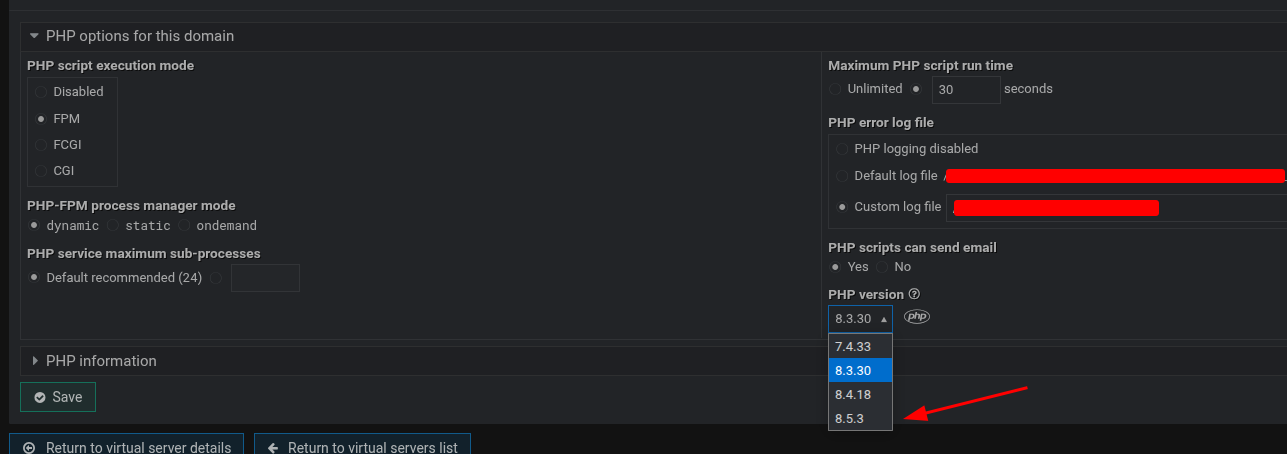
From the Virtualmin interface under PHP Options I can see I have PHP 8.4 as default and PHP 8.3 not active. I dont have PHP 8.5 but this PHP 8.5 was set (not by me) as default in client (SSH) after installing Wordpress using the web installer.

I dont see any reason why the web installer should alert me or change PHP when I’m running PHP 8.4 and the same is showed in the Virtualmin interface. Also on other two different host I run Wordpress and the health Wordpress tool show no issues so I have all necessary requirement.

If we are going to change the PHP version for a domain when installing a web app, it needs to be pretty careful about it. Existing scripts might depend on the prior version. And, obviously, if there’s a symlink of ~/bin/php pointing at a PHP version, it needs to update when the default version does (to bring it back to the original topic).

I feel uneasy about automatic version changes, though.

maybe sending an email when this happens, just in-case the admin is not aware of it.

for which user root or a domain owner user ? and which user does FreeScout run as ? if you followed FreeScout’s installation instructions to the letter Freescout would be running as the user www-data. Please supply more information on how Freescout was installed as I guess everyone is guessing as to what went wrong without the facts from yourself.
however as you use Ubuntu 24.04 you could run this command from a ssh login

sudo update-alternatives --config php

and from the options choose the version you want the default to be.

FreeScout was running on the Virtualmin virtual user of the virtual server. It was working correctly before use the web app install and was working correctly since long time.

Thanks for the screen and the command to choose the default PHP for client, I have already wrote that after 24 hours of issues I found that as solution.

My post is just a feedback for just alert that I believe if I use Web App Installer on Virtualmin to install Wordpress I don’t expect this made other virtual server broken.

This happened maybe because during the Web App WordPress install some edit has been done to the server PHP. I don’t understand why this happen as I run PHP 8.4 for all virtual server and I have two different Virtual server with a perfectly working Wordpress not installed by the Web App. This installs have all required Wordpress PHP extension.. so for me there is no reason while on a test virtual server installing Wordpress from Virtualmin should edit my PHP configuration and broke other virtual server.

This is just a feedback and I’m happy to see there is a discussion between the Virtualmin team. Maybe they has found or will found something that has caused this.

When I was installing Wordpress from the web app I suppose just the system download and install Wordpress but in the real time logs I see that something has been edited on my php. Maybe I read something like installing pho dependencies.. now I don’t remember what it was but is like some script edited PHP and broke other virtualmin server.

The PHP showed in a info.php file in FreeScout was not changed, seems was still be PHP 8.4 but the client PHP has been changed and this caused fatal issues. I toke a day to find what was causing this and fixing.

Now all is back to normal, it seems. In the future I should remember to be more careful using the web app installer. I used for install Round cube in the last but I have not the issue caused by installing Wordpress. The Wordpress install from the web app installer broke other virtual server.

Yeah, I feel that too, and I’ve also raised these questions before.

What we can do is check if there are other web apps installed on the virtual server and show an error instead. For web apps installed through Virtualmin, it’s easy to check. For others, like FreeScout, it requires some heuristics.

@Jamie, what are your thoughts on this? Why don’t we show a confirmation screen instead of immediately proceeding, so the user can confirm if they’re okay with the PHP version switch before continuing the installation?

Or, it might be even better to display an alert banner before starting the installation, informing the user that the PHP version will be changed from the current one to the given version, and that this change may affect other web apps on the server.

Yes, for sure, it’s a bug if it doesn’t.

Why change the PHP version?
In my server the PHP version was 8.4 with all Wordpress required extensions.
I dont know if the Web App installed a PHP dependency creating issue but this was not necessary as I told I run two Wordpress install that I installed manually and no issue. Why for the Web App installer a PHP change is needed?

Maybe even a banner that alert of something can cause the same behavior I experienced because I never expect asking Web App to install Wordpress will broke other virtual server and made edits to the current PHP version.

I can understand maybe if my server was missing the supported PHP and necessary PHP extensions but in this case maybe the setup should show the issue and asking to resolve or auto-resolve but in my case.. PHP 8.4, already two working Wordpress on other two virtual server… why the setup has edited the cli PHP?

I really dont understand.
I expect the web app do what I should do manually just download Wordpress and install it without edit my server configuration. Ok maybe when PHP is not ready as in my case can be necessary fix it but was not my case.

What this means? What is the given version?
If I had PHP 8.4 why the Web App broke PHP by set PHP 8.5 as default PHP client?
This PHP 8.5 is not selectable by the Virtualmin interface so I suppose some issue has happened on the web app Wordpress setup process.

I seem to be able to select PHP 8.5 from the virtualmin interface just fine