Thanks, it seems Cloudflare really have something with the handshake.
I turn on the proxy, and it finally works.
Thanks, it seems Cloudflare really have something with the handshake.
I turn on the proxy, and it finally works.
As a Virtualmin Pro user with the new Virtualmin 7.50.0 release, you can use the new Bunny DNS provider, which also supports a proxy feature.
Today i create new Virtual Server again.
But the domain using NS from domain vendor, not using Bunny or Cloudflare.
It result on ERR_SSL_PROTOCOL_ERROR again
cURL and openSSL inside the server is fine.
cURL and browser access will get ERR_SSL_PROTOCOL_ERROR
I’m getting frustated again now.
curl -Iv https://domain
testssl reports :
SSLv2 not offered (OK)
SSLv3 not offered (OK)
TLS 1 not offered
TLS 1.1 not offered
TLS 1.2 not offered
TLS 1.3 not offered
your SSL configuration seems “messed up”.
what’s in the apache vhost? (write all lines starting with SSL… )
SSLEngine on
SSLProtocol all -SSLv2 -SSLv3 -TLSv1 -TLSv1.1
SSLCertificateFile /etc/ssl/virtualmin/1760409201886778/ssl.cert
SSLCertificateKeyFile /etc/ssl/virtualmin/1760409201886778/ssl.key
SSLCACertificateFile /etc/ssl/virtualmin/1760409201886778/ssl.ca
Just that..and it actually the same with other past Virtual Host (that have no problem)
Apache Error Log:
[Fri Oct 10 12:27:07.381106 2025] [ssl:warn] [pid 678680:tid 140103480002880] AH01906: paketb.nectarweb.co.id:443:0 server certificate is a CA certificate (BasicConstraints: CA == TRUE !?)
[Tue Oct 14 12:10:52.152377 2025] [ssl:warn] [pid 1472244:tid 139989073684800] AH01906: domain:443:0 server certificate is a CA certificate (BasicConstraints: CA == TRUE !?)
[Tue Oct 14 09:38:21.455159 2025] [ssl:warn] [pid 1472244:tid 139989073684800] AH01906: domain:443:0 server certificate is a CA certificate (BasicConstraints: CA == TRUE !?)
[Tue Oct 14 09:34:06.497637 2025] [ssl:warn] [pid 1472244:tid 139989073684800] AH01906: domain:443:0 server certificate is a CA certificate (BasicConstraints: CA == TRUE !?)
I have tried openssl x509 -in /etc/letsencrypt/live/domain/cert.pem -noout -text | grep -A2 “Basic Constraints”
result:
X509v3 Basic Constraints: critical
CA:FALSE
X509v3 Subject Key Identifier:
Just remove SSLCACertificateFile from your Apache config, and you’re all set.
Sadly it still didn’t work at all


still same connectivity error
Further investigation, i found many ssl error on apache log
[ssl:error] AH02032: Hostname x.x.x.x provided via SNI and hostname xxx.com provided via HTTP have no compatible SSL setup
If you re-request SSL certificate for the domain using “Setup SSL Certificate” page, does it work? If not, what error message do you get?
Validating configuration for hencointerior.com ..
.. no problems found
Requesting a certificate for hencointerior.com, www.hencointerior.com from Let’s Encrypt ..
.. request was successful!
Configuring webserver to use new certificate and key ..
.. done
Updating service certificates ..
.. done
Applying webserver configuration ..
.. done
Validating configuration for paketb.nectarweb.co.id ..
.. no problems found
Requesting a certificate for paketb.nectarweb.co.id from Let’s Encrypt ..
.. request was successful!
Configuring webserver to use new certificate and key ..
.. done
Updating service certificates ..
.. done
Applying webserver configuration ..
.. done
No error, the request is successful, for the older other virtual server, after i tried to manually request, it also successful, but the certificate is not immediately updated. The website still load the older certificate. Not the newest certificate that just been requested.
So the new Virtual Server : ERR_SSL_PROTOCOL_ERROR
The older virtual server that already have new certificate: still load the older certificate.
that sounds like a propagation error (it takes time for it to happen) have you tried clearing browser cache?
Yes i have, clean browser everytime when checking.
It’s not propagation issues, since it happen in a pattern for at least 10+ websites. I already tried, and the pattern is the same.
Try disabling the Apache website feature on the “Edit Virtual Server” page, then re-enable it. This will regenerate your possibly incorrect Apache config.
After disabling and re-enabling Apache on Edit Virtual Server:
For the https://paketb.nectarweb.co.id/
Finally it works.
But the funny thing, it load the certificate that i create at October 11th, not the newest one, that i just created.
=====
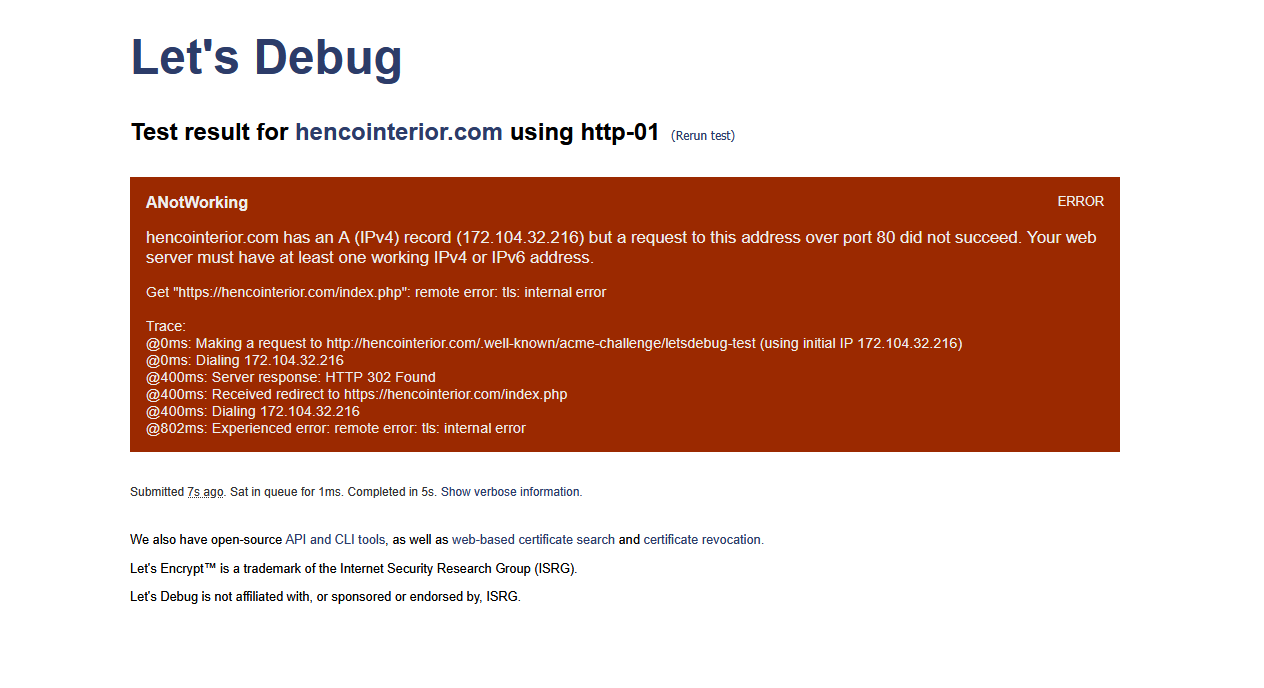
For the https://hencointerior.com, it still didnt work, still provide ERR_SSL_PROTOCOL_ERROR
hencointerior.com sent an invalid response.
ERR_SSL_PROTOCOL_ERROR
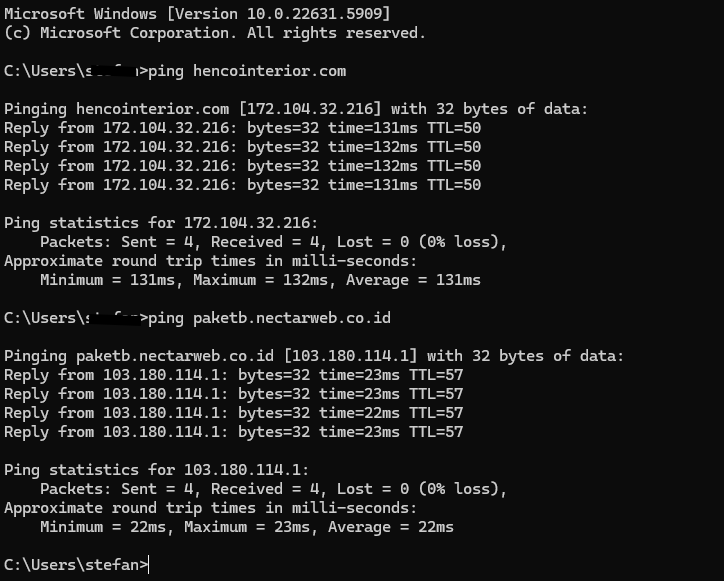
paketb.nectarweb.co.id is using bunny DNS proxy DNS. What shown in your ping is bunny DNS IP.
hencointerior.com is using direct DNS zone from domain vendor.
They are at the same server actually.
If you do that, then Bunny should handle the Certificates not virtualmin.
If I look at http://172.104.32.216/ then I do see the site, not sure why your having so much issues.
No redirect at all..