I never set anything as per instructions when setting up Virtualmin, nor have I enabled this by the CLI myself.  . This was done by the OS. I also used the Ubunutu Minimal Server install.
The question becomes WHERE to draw the line. It would be easier if only a single distro was supported, BUT, if you are going to support multiple distros then the behavior needs to be the same across all. If one distro automatically installs a feature that isn’t on others things start to get chaotic. If the interface shows one thing and the underlying distro is doing something else, well, that is a problem. They need to be synced. The panel must accurately reflect what is going on if a setting is offered.
@ID10T I 100% agree
I use Debian Netinst… and have never seen this issue.
I think we’re still getting our wires crossed here a bit. There are two separate layers in play, and they’re not the same thing.
The setting in *min controls what *min itself does when it checks for updates. It doesn’t, and frankly can’t, magically overrule every other update mechanism you may have running on the box. Joe has already said as much: if unattended-upgrades is installed and active, then those updates are being handled by the OS, not by the control panel. That isn’t Virtualmin “ignoring” its own setting; that’s a separate bit of software doing exactly what it says on the tin.
And at this stage, that’s not even up for debate, because your own systemctl status unattended-upgrades output shows the service is enabled and running. So there is already a perfectly ordinary explanation for what you’re seeing. No mystery, no conspiracy, no panel gone rogue in the night.
Now, to be fair, I’ll grant one point: the wording in the UI could perhaps be a touch clearer for people who aren’t living and breathing Linux package management. If the argument is “the interface could make it more obvious that this only applies to updates managed by this module, and not OS-level automatic update services”, that seems entirely reasonable to me. Fair enough. That’s a feature request.
But that’s quite a different kettle of fish from saying, “I selected notify only in Virtualmin, therefore nothing on the OS should install updates automatically.” That simply doesn’t follow.
A control panel is an admin layer. It isn’t a replacement for the operating system, and it isn’t the Supreme Court of apt. Once unattended-upgrades is installed and active, you have explicitly allowed package operations to happen outside the panel. Expecting Virtualmin to somehow veto that is a bit like blaming the dashboard because the engine started when you turned the key.
What makes this all slightly more awkward is that your own notes on update policy explicitly mention unattended-upgrades on Debian/Ubuntu, and also acknowledge that some update behaviour is not controlled by Virtualmin or Webmin – under " Update Strategy (Policy)". Which is, with respect, more or less the very distinction being explained to you here.
So, for me, the position is fairly straightforward:
- this isn’t a *min bug;
- it may well justify clearer wording or a warning when
unattended-upgradesis detected; - but it remains the administrator’s job to understand where the panel stops and where the operating system begins.
There’s nothing wrong with wanting a control panel to save you from living in a shell 24/7. That’s rather the point of having one. But using the panel as grounds to pretend OS-level tools don’t count is where this starts to go a bit off the rails.
In short: if you install or leave enabled a service whose entire purpose is to install updates automatically, it’s a bit rich to then act surprised when updates are installed automatically.
Research From my article
you can just install
unattended-upgradeson Debian/Ubuntu
This was discussion about using automatic updates and @joe mentions that he prefers to use unattended-upgrades or dnf-automatic. This does not say I installed it.
I did not install it (how many times do I have to say this) and I assumed that the Virtualmin installer configured the system as needed. Virtualmin does install postfix, mariadb and a load more packages so it can remove them if needed when doing a setup. Just because a package is installed outside of Virtual,min does not mean that it can never be removed by VM or WB.
CPanel and Plesk options, I guarantee do what they say and 99% of admin is done from within WHM and the Plesk Admin, this is their purpose in life. This is why they can be used in the Enterprise space as all actions can be funnelled and controlled. The panels also support several Linux flavours and possibly Windows.
I know @joe always says that VM and WB are not your OS, but they do configure the OS. VM and WB do not have any binaries of their own that the OS needs to run. I am not sure if they use a middleware, perhaps they should, if not.
it is on, but I did not install it.
If an option is offered then it should be honored. I’m still on Debian 11, upgraded from 10, and I don’t see this behavior. This may be a more recent ‘do gooder’ feature that has been added and Webmin will need to take it into account now or stop offering the option if it can’t honor it.
The panel simply MUST be in sync to what is happening. That kinda is the purpose of the panel.
unattended-upgrades is a package that has existed on Debian and Ubuntu for many years, pretty much as long as I can remember.
It historically has not been installed by default. Many hosting providers add it to their default image, however. But, maybe Ubuntu has made it a standard package in some/all install profiles, I don’t know.
We can add a notice about it, but this is one of those OS things we don’t want to change without being clear about what’s going on. We certainly wouldn’t want to disable it as part of our installation. We really try to respect your choices, and if you’ve installed a package that performs upgrades automatically, we don’t want to break that (we have no way of knowing whether you or your host installed the package, we know we didn’t install it).
It’s a ubuntu thing i guess, it’s been around on ubuntu for a while now and i would guess it’s a service that is installed and enabled when the OS is installed so therefore the virtualmin installer wouldn’t touch it on installation but that said perhaps if the virtualmin installer detects it, it could disable the service and warn the user it has been disabled and an option to enable it or just report to the user it’s installed and enabled and give them an option to stop and disable it if they so wish
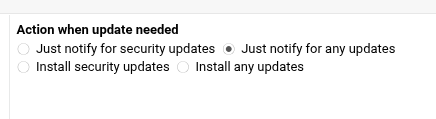
No! If a control panel would do that (or similar actions), it’ll be heading the wrong direction and I would clearly challenge the dev team upon their decision-making.
The UI for this particular thing is not managing unattended-upgrades. It’s managing a Virtualmin feature, which does not use unattended-upgrades to perform updates. There are often multiple ways to do things, and e.g. the Firewalld module should not change the state of a Shorewall firewall or vice versa.
And, that package is not available on all of our supported operating systems, it is a Debian package that also appears on Ubuntu.
Again, I can see how this could be confusing for folks unfamiliar with unattended-upgrades. So, we can certainly make it provide a notice if unattended-upgrades is enabled to alleviate that confusion. But, unless we make a module/page for the unattended-upgrades package/service, clearly labeled as such, it feels disrespectful to modify that state without being clear about what is being modified.
Since unattended-upgrades is not available on EL systems (it has dnf-automatic, which is new-ish, there have been previous ways of doing it), it doesn’t make sense to make it the default way to manage this capability. If we did make it manage an OS-package we’d then need to depend on it, configure it at install time in some sensible way (we have no easy way of knowing what you did vs. what your host did in terms of installing/configuring it). And, it’d have to be clear that it’s managing some OS service. I dunno. Jamie likes to make features like this generic and not dependent on a specific OS/version.
as a bit of a bystander to this,
that is more concerning. We install an OS and expect the image of the OS to be vanilla and when we add a panel we expect that panel to only add basic requirements or options.
anything that helps to alleviate confusion helps
Who’s “we”? Please don’t generalise. I reckon there are readers of this thread who didn’t even know of unattended-upgrades until now…
If people don’t care about these things while setting up an internet-facing server, it’s better to have at least some upgrade mechanism/automation enabled by their providers than none at all. The “fire-and-forget-approach” won’t work in this field.
yes, you are right. I was one of them. I have several OS and am now concerned that I may have unattended-upgrades activated without knowing they were. not having been warned or having wanted or knowing their impact. as in “known knowns …”
Ubuntu server has the security update thing installed by default it seems. I thought I posted the link but I guess I never hit submit.
Maybe a check and a warning that ‘you have THIS enabled and this page will not override it’?
Honestly, it’s been a long time since a distro upgrade broke a system on me, but I still prefer to know when/what updates are being applied just in case.