Yes precisely. Let’s have an example here. This it what I see on the PHP Options page (screenshot very similar to Charles’ one: PHP-FPM configuration error on all server's sites).
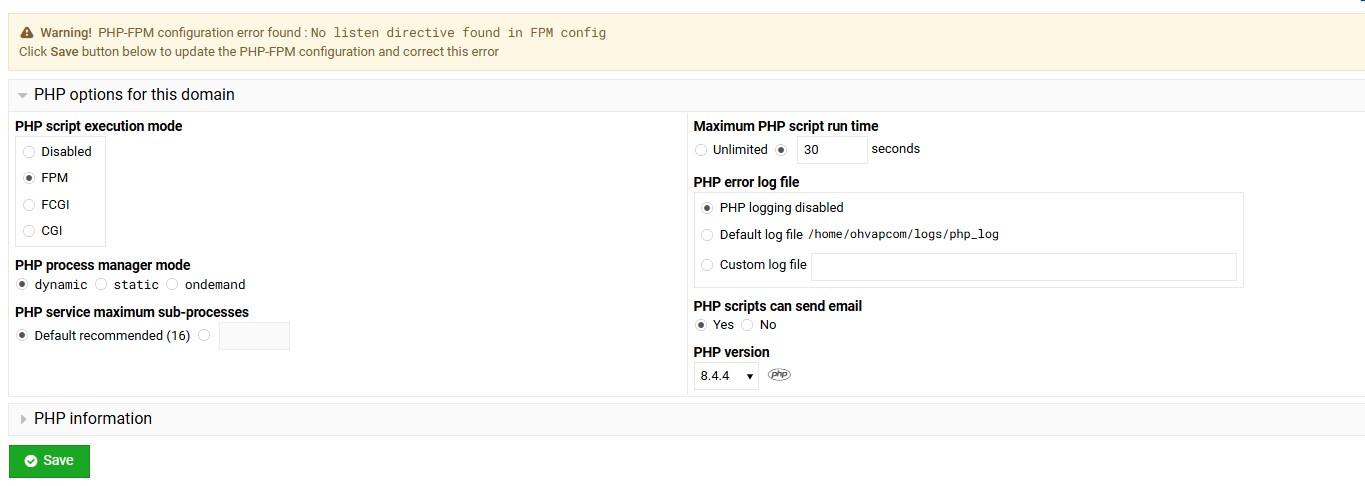
It looks like the Virtual Sever is running PHP 8.4.4 … but it is not! It is still running the PHP version that was previously set. It is easy to check: one just have to click on the PHP icon next to the PHP version to look at the phpinfo(). In my case, it shows this.

The website is actually running PHP 7.1, that is the version that was configured prior to the problem. And by te way @Ilia the site is running just fine, no problems there.
Moreover, if I click on PHP-FPM Configuration, I see this.

Virtualmin believing wrongly that the Virtual Server is set to PHP 8.4, it is searching for the following configuration file: /etc/php/8.4/fpm/pool.d/17328095172188054.conf The 17328095172188054.conf file does exist, but in /etc/php/7.1/fpm/pool.d/, not in /etc/php/8.4/fpm/pool.d/ My understanding is that Virtualmin “forgot” the PHP settings of the Virtual Server, somehow falls back to default configuration and expect the config file in the wrong folder, hence the error message on the PHP Options page.