They said they had a flood and lost some servers so they had to put me on a different server. When I say different server, I mean the host gave me a different server as I didn’t change hosts.
Ah, serious for them but any competent provider has a good disaster recovery plan in place and it should have been seamless to you their valued customer.
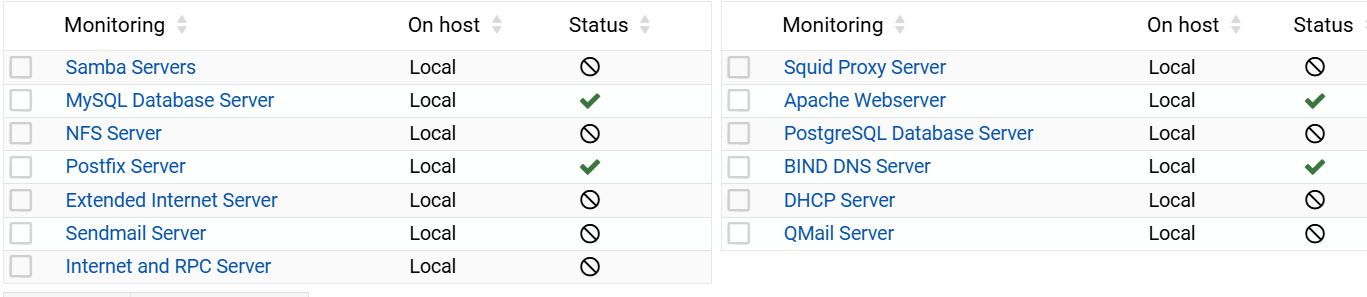
Yeah it could have been more seamless. Basically I received a new login as they pre-installed 20.04 an then I reinstalled 24.04. Fortunately I had backups so it wasn’t very painless until I started having mysql errors. Literally never communicated with them in 5 years.
Unfortunately this didn’t not work as it kept looping mysql as I could see the PID change.
please make sure you have a decent backup before trying to fix this system.
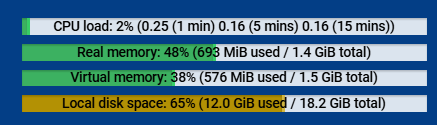
This has been kicked around before. OOM doesn’t necessarily kill the process that is causing the problem so a spike elsewhere could be the problem.
Yes, if memory usage looks fine most of the time, it’s probably some process that spins up periodically instead of the ones running all the time. e.g. automatic software updates, backups, etc.
You’d want to look at when it failed and figure out what kinds of things happen during that time.
Yes true I did read that it doesn’t necessarily kill the process that has overloads the memory.
Could it be a slow sql query, lol
I’ve tried everything under the sun. I stopped anything that I wasn’t using like postFIX and DoveCot. Changed from fail2ban to sshguard. Still get OOM crashes. I look at top and everything looks good then all of a sudden crash. I have a crontab to check if mysql has stopped and restart. Not ideal but I don’t want to sit there and manually check if mysql has stopped as it crashes every 24 hours or so.
You need to run the slow query log and see if something there is causing an issue.
That may be getting ahead of things. We don’t know that it’s MySQL causing the memory spike…it probably is not, based on what information we have (“happens every 24 hours or so”).
What we know points to some scheduled job doing something crazy. On Debian/Ubuntu, a huge number of package updates can make apt-get balloon to a huge size. Some kinds of backup process might rack up some numbers if there are a lot of files. I don’t know what else would cause a spike, but OP needs to narrow down the time when it happens to something specific (not “every 24 hours or so”).
They need to narrow it down by reading the log (the journal on a systemd system) to find exactly when MySQL is killed. Then, from there, figure out what processes run a bit before that.
I had error log and slow queries log turned on but nothing was found in the files. My my.cnf file had a line to inlcude the conf.d directory to read in the cnf files. For unknown reasons, they weren’t being read in so I had to move the lines to my.cnf file and restart. I am not sure what settings were even being used as the my.cnf file was blank with just the includes.
I have nothing scheduled to happen on my server. I don’t have any daily backups scheduled. The only entries in the crontab are for VW to read in the awstat files. I looked at the systelog and there is no set pattern for when OOM kills mysql. I do not see any entries in the OOM dump. Worpress does use php-cgi8.1 which I do get those but they don’t take up much memory.
I run RedHat systems. I have not had an OOM issue for many months, so my memory could be off … plus obviously these comments are NOT from any Ubuntu background …
having said that, my vague memory says, in /var/log/messages, when OOM kicks in, it logs a PS style output showing the current state of the system. Does that happen on Ubuntu as well – if so those details may be helpful to narrow down your issue.
Yes, Ubuntu dumps a crash log.
It’s a bit hard to decipher. Myql doesn’t restart by systemd as it goes into a loop.
2025-09-14T06:30:08.353153Z 0 [System] [MY-010116] [Server] /usr/sbin/mysqld (mysqld 8.0.43-0ubuntu0.22.04.1) starting as process 30004
2025-09-14T06:30:08.409595Z 1 [System] [MY-013576] [InnoDB] InnoDB initialization has started.
2025-09-14T06:30:10.529879Z 0 [System] [MY-010116] [Server] /usr/sbin/mysqld (mysqld 8.0.43-0ubuntu0.22.04.1) starting as process 30038
2025-09-14T06:30:10.578661Z 1 [System] [MY-013576] [InnoDB] InnoDB initialization has started.
2025-09-14T06:30:11.577591Z 1 [System] [MY-013577] [InnoDB] InnoDB initialization has ended.
2025-09-14T06:30:22.697370Z 0 [System] [MY-010229] [Server] Starting XA crash recovery…
I found a website that analyzes kernel.log files for OOM issues. Each file returned that apache2 was causing the OOM to kill mysql. I changed MaxConnections or whatever it is called now to 50. I also reinstalled fail2ban and added wp-fail2ban addon to my WP sites. So far no more OOM crashes after 24 hours. I suspect the sites were getting hit all at once which created the memory spike which invoked OOM.
It’s worth noting that crawlers for AI companies have remarkably increased traffic for web servers on the Internet. So, a system that was sufficient a year or two ago may not be able to handle the onslaught.
But, yeah, also don’t try to tweak any services for performance (by cranking up processes, caches, buffers, etc.) on a low-memory system. You’ll make performance problems worse, possibly catastrophically, if you end up using swap memory for some services.