How can i configure custom nameserver to domain provider?

On the server itself:

host harshvardhansolanki.com localhost

If that works, it means BIND is working and configured correctly (at least for that one record in that one zone, you may have other problems).

So, if BIND is working and configured correctly for that one record in that one zone, you need to figure out why requests from outside are timing out. I’m not sure how to troubleshoot that, as it’d be a weird problem (it’d mean you changed where BIND is listening maybe?). Let’s just check this and then go from there.

Result:

Using domain server:
Name: localhost
Address: 127.0.0.1#53
Aliases:

harshvardhansolanki.com has address 140.245.16.10
harshvardhansolanki.com mail is handled by 10 jaws-in1.mailshark.com.au.
harshvardhansolanki.com mail is handled by 20 mx2.zoho.in.harshvardhansolanki.com.
harshvardhansolanki.com mail is handled by 10 jaws-in2.mailshark.com.au.

Ping now resolves, but doesn’t answer. But evidently lots of caching since it was previously used and not a new domain.

Some of the NS records have updated but all of the A records seem old.

That service is useless to us in this problem.

root@main:~# dig @ns1.harshvardhansolanki.com  harshvardhansolanki.com

; <<>> DiG 9.16.50-Debian <<>> @ns1.harshvardhansolanki.com harshvardhansolanki.com
; (1 server found)
;; global options: +cmd
;; Got answer:
;; ->>HEADER<<- opcode: QUERY, status: NOERROR, id: 35852
;; flags: qr aa rd ra; QUERY: 1, ANSWER: 1, AUTHORITY: 0, ADDITIONAL: 1

;; OPT PSEUDOSECTION:
; EDNS: version: 0, flags:; udp: 1232
; COOKIE: dec7d5253ad473890100000067e2fce6400144e743389eb3 (good)
;; QUESTION SECTION:
;harshvardhansolanki.com.       IN      A

;; ANSWER SECTION:
harshvardhansolanki.com. 86400  IN      A       140.245.16.10

;; Query time: 239 msec
;; SERVER: 140.245.16.10#53(140.245.16.10)
;; WHEN: Tue Mar 25 14:58:46 EDT 2025
;; MSG SIZE  rcvd: 96

OK, so why can’t we reach it from outside?

Is BIND listening on all addresses?

On the server:

netstat -lnp |grep :53

Oh, actually, nevermind. It’s working now.

# host harshvardhansolanki.com 140.245.16.10
Using domain server:
Name: 140.245.16.10
Address: 140.245.16.10#53
Aliases: 

harshvardhansolanki.com has address 140.245.16.10

harshvardhansolanki.com mail is handled by 10 jaws-in2.mailshark.com.au.
harshvardhansolanki.com mail is handled by 20 mx2.zoho.in.harshvardhansolanki.com.
harshvardhansolanki.com mail is handled by 10 jaws-in1.mailshark.com.au.

So, you did something that fixed external users being able to query your DNS server.

DNS looks good, at least for the records I’ve looked at. Next problem, I guess. Make a new topic for your website redirect problem.

Redirect problem solved but the main problem didn’t solved yet.

Redirect all requests to SSL site this option enabled and force www enabled so now closed

https://support.hostinger.com/en/articles/5726596-how-to-change-the-dns-resolvers-on-vps

I’m pretty sure this isn’t a good idea. This is simply the name of the server the VPS is using for DNS and not related. They are probably pushed out via DHCP. Changing to the local DNS when it doesn’t seem to be working would make things worse.
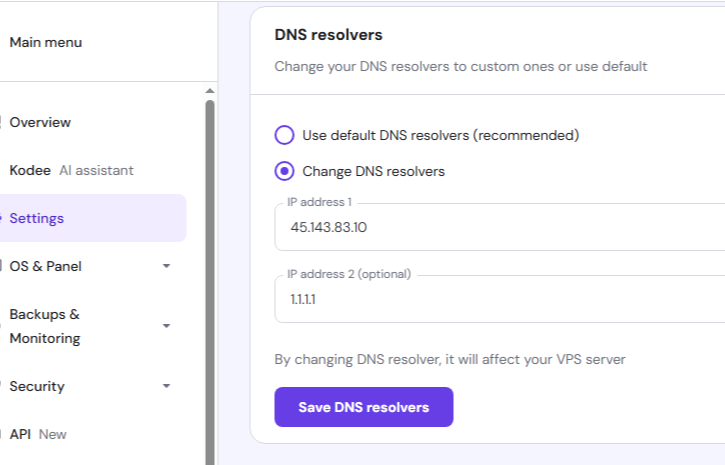
They are not hosting on Hostinger (it is at Oracle Cloud). The DNS zone is registered through Hostinger.

They are not trying to change the resolvers on their server, they are trying to change the name servers for their DNS zone.

The problem was solved already, and OP has moved on to other issues.

Now website have https:// connection but not have any livingness the website have same DNS_PROBE_FINISHED_NXDOMAIN error.

What are the all aspects and conditions for that error?

By that we can reverse fix the DNS error.

Website is now accessible, DNS Key is making error, created new and deleted previous from the Hostinger.

Now i can surf harshvardhansolanki.com