I have rewritten my python script and have moved it all to the shell script and used the New IP and Hostname command Parameters $1 and $2 to hopefully update my DNS Host Records at my Registrar.
I will have to wait for an IP change as well before I will know if I did it correctly.
The python script ran on a cron job (I think I had it going every 5 min) and stored a copy of the server’s IP address in a local file. It compared the current IP with the last one saved. If they were the same it would exit. If they were not the same it would update my host records (on my registrar’s server.)
It also read the response back and logged any returned info.
Then I would manually change the IP information on the server for any virtual server that needed it when Webmin indicated the IP change had happened. I seem to recall that all I had to do was select something in Webmin when it warned me. If it didn’t work properly I would change the virtual server info in the apache config file.
Now, my understanding is, by using the Dynamic IP Update tool, Virtualmin will take care of the internal virtual server ip updating, and all I needed to do is to change the host records. Since the 5 min checks are handled by the tool I can skip the cron job.
The new IP is provided as a command parameter ($1) so I can now just send the new IP to the registrar in a script. I therefore changed from python to a shell script and removed all unnecessary code.
Now the new shell script just sends the new IP($1) and the Hostname ($2) to my registrar to change my records.
It still includes a loop to update all the records (sub domains.)
If the script is only run when a new IP is recognized I no longer need to provide a change_of_IP check and the Update_Host_Records will run and complete all the updates.
What I am still unclear on is:
Since the Dynamic IP Update tool is supposed to be taking care of any local IP changes, why is the Virtualmin command:
virtualmin modify-all-ips --default-old-ip --detect-new-ip
needed to be called in the script?
Isn’t that the point of the tool?
Shouldn’t this be called as part of the Dynamic IP Update tool as its basic function or is it only applied when using the dynDNS option and not included when the other two options are used?
I am also not clear as to the use of some of these
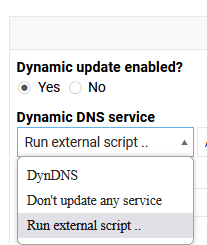
If I select Dynamic update enabled (No) I would expect that the tool is disabled?
What does selecting Don’t update any service do?
Isn’t that the same as the first option or are other things happening?
Wouldn’t it also make sense to make these variables available for scripting in case they were useful?
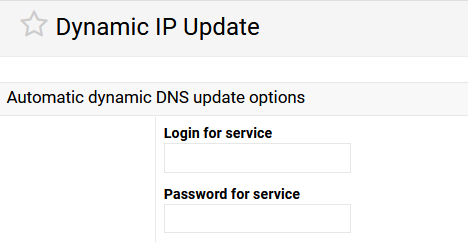
My service requires a password which I just add in the script but it feels strange to me, that the tool provides the option to use this but it only applies to dynDNS?
Like I said in other comments, I am probably only viewing this from my own perspective and not seeing it as other are. I don’t have any experience using dynamic DNS tools and really only have the one simple task to take care of if my dynamic IP changes on my server.
I rely on you experts to do the heavy lifting, and I really appreciate all the hard work and effort you guys put into this to make it easier for the rest of us.
Thanks again for all your help.